PREPARATION –
* File list: openwrt-alfa-nx-jffs2-sysupgrade.bin
(This is for upgrading from terminal console, and you can download it from Alfa Network’s download section )
* Console Cable Kit from Alfa Network.
* Environment : windows XP with procomm( I already setup for Aviv)
PC IP address : 192.168.2.100
TFTP server
* Steps summary:
– PCBA/console board setup
– Upgrade firmware from terminal console
– Run the CTLPower utility
PROCEDURE –
1. Baudrate is 115200 8N1
PCBA & console board configuration


2. Open the terminal console program, boot up N2 PCBA & press 2
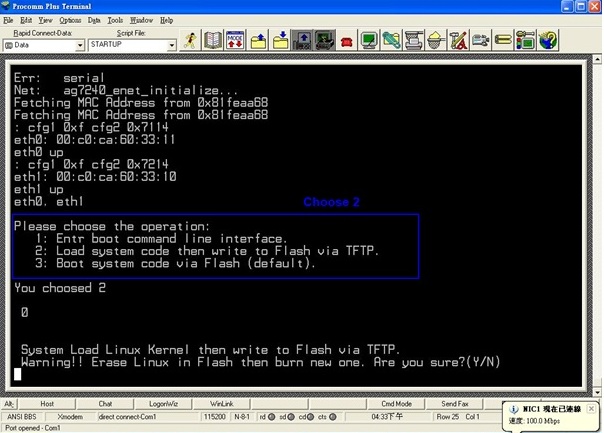
3. After N2 PCBA is reboot, press 2 when you see ‘choose the operation’
Are you sure?(Y/N) Y(enter)
Input device IP(192.168.2.10) ==: (enter)
Input server IP(192.168.2.100) ==: (enter)
// for my case, I set windows xp PC’s IP address as 192.168.2.100
Input image filename () ==: openwrt-alfa-nx-jffs2-sysupgrade.bin (Enter)
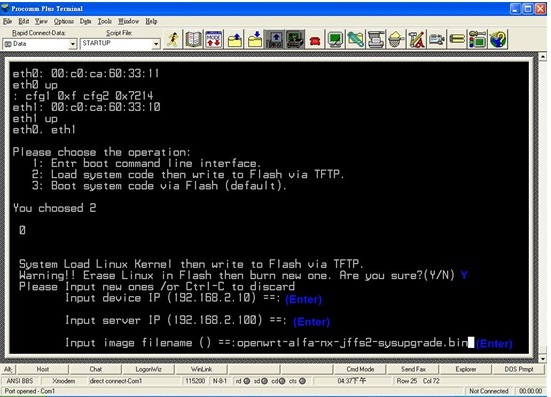
4. Wait the process finished

5. After the process finished, it will reboot again
Next, switch the RJ45 cable to LAN port
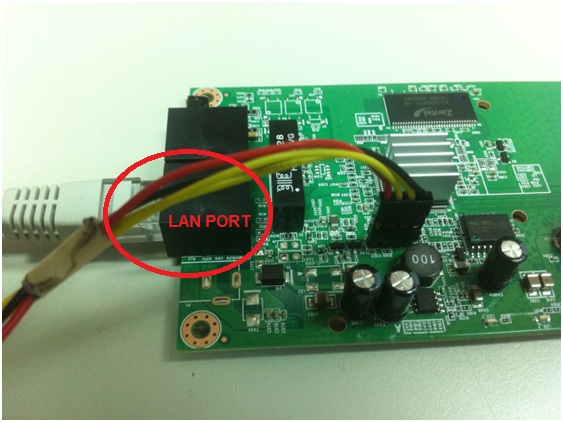
6. OK…everything is done.

 ALFA Network Inc.
procomm plus?
LikeLike
Hi, in the step 3 i cant see the \”chose operation\”i must add the user & password. cant you tell me the user & pass login?Thanks
LikeLike